Soon to Default Payment Plans Report
The Soon to Default Payment Plans report identifies payment plans that will default a specific number of days in the future, up to 30 days. You can stay abreast of the total amount of debt at risk by identifying which payers are most likely to default and how soon.
 Who can access the report?
You must have the Access to Soon To Default Payment Plans Report permission or the reports superuser permission to be able to generate the report.
If you need access, please contact the Flywire administrator at your institution or contact Flywire Support at [email protected].
Reports superuser
A user is considered a reports superuser when they are given the Ability to review all reports permission. The superuser permission includes the following individual permissions:
-
Ability to access Communication Campaign Report
-
Ability to download PDFs from S3
-
Ability to view a report of staff notes
-
Access to Account Reconciliation Summary Report
-
Access to Authorized User Report
-
Access to Cash Flow Report
-
Access to Mobile/Email Updates Report
-
Access to Payment Plan Rebalance Report
-
Access to Payment Plan Summary Report
-
Access to Payment Summary Report
-
Access to Recently Defaulted Payments Plans Report
-
Access to Soon To Default Payment Plans Report
-
Access to User Access Report
-
Access to Users Viewing Offers, Not Completing Report
-
Access to the Bad Email Addresses Report
-
Access to the eRefund Enrollment Report
-
Access to the eRefund Status Report
-
Access to the Financial Responsibility Agreement Report
-
Access to the Payment Plan Installment Report
Running the Report
-
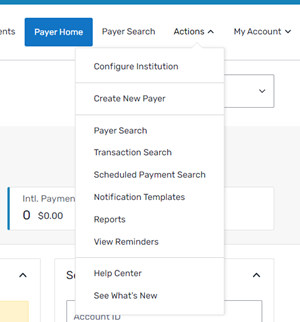
Select the Actions menu and click Reports.
-
On the Report List page, click the Soon to Default Payment Plans link.
-
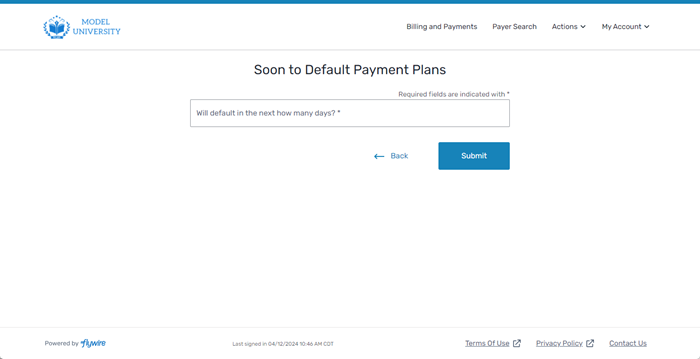
On the Soon to Default Payment Plans page, enter the number of days (between 1 and 30) in the future for which you’d like to see results.
-
Click Submit. A page displays with the report.
You can click the Export to Excel button to download an excel file of the report.