Agency Placement Report
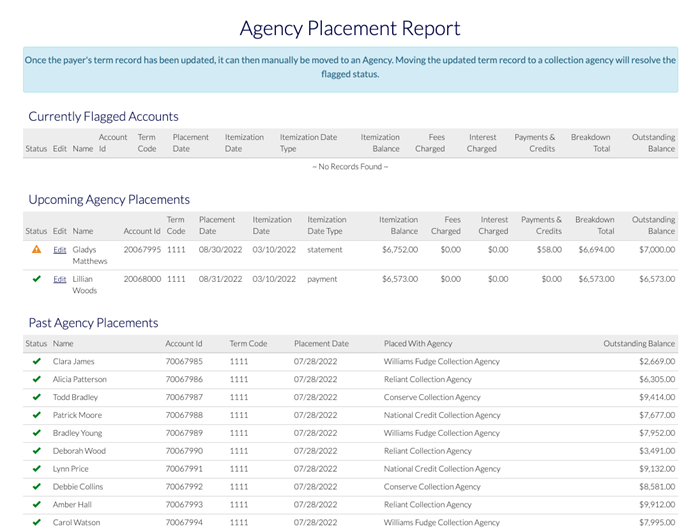
The Agency Placement Report displays the status of currently flagged accounts, upcoming accounts, and accounts past agency placements.
Currently Flagged Accounts
The Currently Flagged Accounts section lists accounts that were scheduled to be auto-placed with an agency but failed validation. Accounts remain flagged until the error is resolved or the account(s) are manually moved to a placement without auto-placement.
See Validation Error Resolution for detailed information about resolving a flagged account.
Upcoming Agency Placements
The Upcoming Agency Placements section lists account that are scheduled to be auto-placed with an agency in the next 30 days.
If an account fails validation, it will display with a  icon and must be resolved for auto-placement to complete.
See Validation Error Resolution for detailed information about resolving a flagged account.
Past Agency Placements
The Past Agency Placements section lists accounts that have been placed with agencies in the past 30 days.
 Who can access the report?
You must have the Ability to place a collection account at an agency permission to be able to generate the report.
If you need access, please contact the Flywire administrator at your institution or contact Flywire Support at [email protected].
-
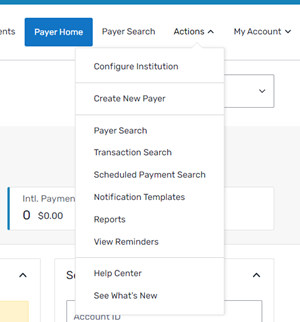
Select the Actions menu and click Reports.
-
On the Report List page, click the Agency Placement Report link.
Validation Error Resolution
A validation error indicates the student is either:
-
Missing the bill balance breakdown (Regulation-F data)that is required for agency placement.
-
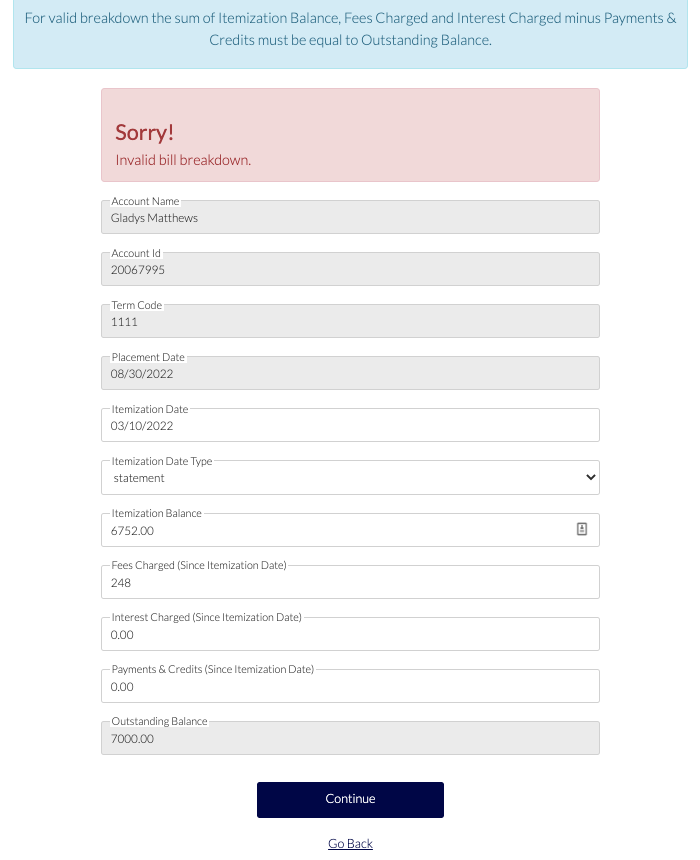
The current outstanding balance does not equal the Itemization Balance provided by the school in their latest placement file.
To resolve this error, make updates to the bill balance breakdown in the placement file or manually edit the bill balance breakdown in the Agency Placement Report. Once the bill balance data is updated, the account can be manually moved to a collection agency.
-
From the Agency Placement Report, find the student ID in the Currently Flagged Accounts or Upcoming Placements section.
-
Click Edit to update the bill balance breakdown.
-
On the Bill Balance Breakdown page, update the bill.
Flywire performs the itemization balance validation after you make your updates.
-
Click Continue to confirm your changes.
-
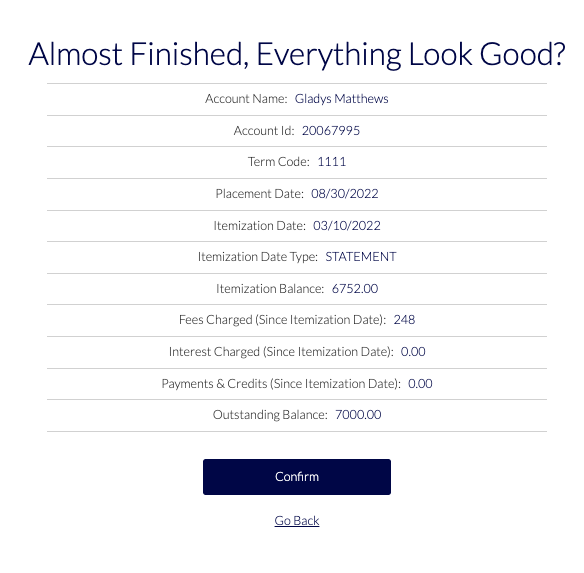
On the Almost Finished, Everything Look Good? page, review the changes and click Confirm.
-
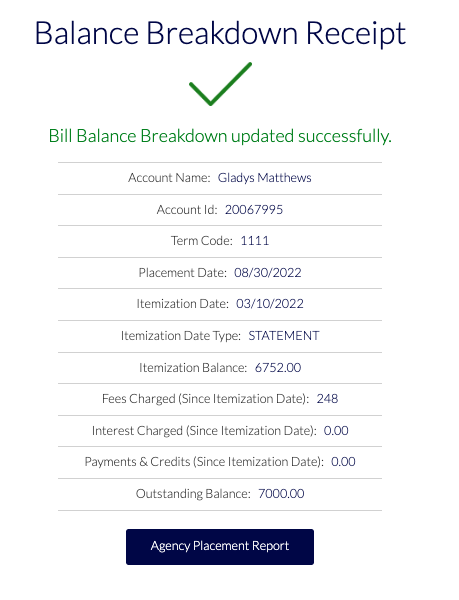
Verify the Bill Balance Breakdown receipt displays to confirm that the itemization balance validation passed.
Itemization Balance Validation
The itemization balance validation is performed whenever an account is placed via placement file, or moved into a Collection Agency Placement (either manually or through auto-placement). The Agency Placement Report allows you to review and edit accounts that fail validation (flagged accounts).
The itemization balance validation compares the itemization balance to the outstanding balance in Collection Management. If the itemization balance does not equal the outstanding balance then Flywire will check other data fields to determine if valid changes were made after the itemization balance was set.
The other changes that can contribute to the itemization balance not matching the collection balance:
-
Added interest assessed after the itemization date
-
Added fees charged after the itemization date
-
Subtracted any payments or credits made after the itemization date
Validation Use Case Example:
-
The student has an itemization balance and outstanding balance of $2750. The outstanding balance was set when the school moved the student into Pre-Collect on June 1, 2024.
What is pre-collect?
In the Pre-Collect phase, past due students are automatically engaged by the SFS to enroll in a payment plan or pay their balance in full.
You define the payment plan offers and communications for your institution.
You configure how long the Pre-Collect phase lasts and the pre-determined intervals when Flywire sends payment plan offer communications.
If you have the Internal Collections phase configured, the system will automatically move the accounts which have not enrolled in a payment plan or made payment in full to the Internal Collections phase when the Pre-Collect phase is complete.
-
On June 15, 2024 the account was moved into Internal Collections. Auto-placement to the first agency placement is scheduled for July 15, 2024.
What is internal collections?
In the Internal Collection phase, Customer Service Representatives (CSRs), Collectors, and Managers work directly with students to negotiate a payment arrangement.
Collectors can negotiate a custom payment plan with a student and send them an offer to enroll.
Your Managers and CSRs can use the SFS dashboards to see the daily work queue and view available reports and analytics.
At the end of the Internal Collection phase, the accounts which have not enrolled in a payment plan or made payment in full may be automatically placed for first round with collection agencies or any other configured placement such as Shelved.
-
On June 21, 2024, the student makes a $250 payment to you which updates the outstanding balance to $2500.
-
On July 1, 2024, you reach out to the student and the student indicates they will not be paying any more toward the outstanding balance.
-
You try to move the account to a collection agency and receive an error in the itemization balance validation.
-
To solve this, you navigate to the Agency Placement Report and add the $250 payment to the Payments and Credits field.
-
The student's bill balance breakdown when they are moved to agency placement is as follows:
-
Itemization Balance: $2750
-
Fees Charged: $0
-
Interest Charged: $0
-
Payments and Credits: $250
-
Outstanding Balance: $2500
-
Validation: itemization balance ($2750) + Fees ($0) + Interest ($0) - Payments ($250) = outstanding balance ($2750)