Billing and Payment Management
Billing and Payment Management offers you full student account services. The billing and payment management product includes payment processing and payment plans with additional functionality such as managing credit balance refunds (eRefunds), displaying announcements, accessing tax documents, and automated communications.
The SFS can be integrated with Banner, Peoplesoft, and Colleague ERPs.
Dashboards
|
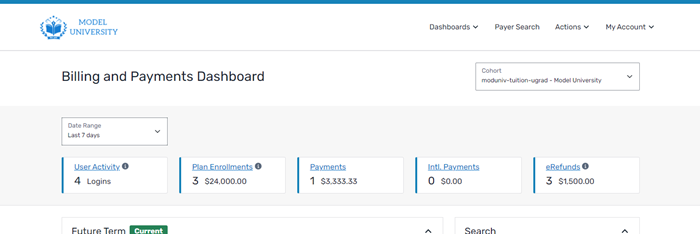
You can see an overview of your institution using the Billing and Payments Dashboard. |
|
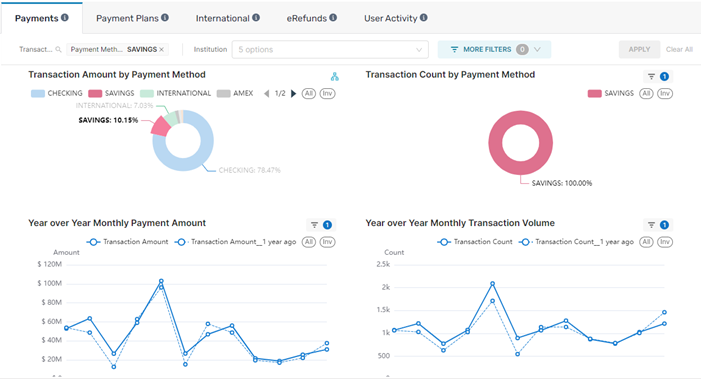
You can view analytics for your institution using the Analytics Dashboard. |
|
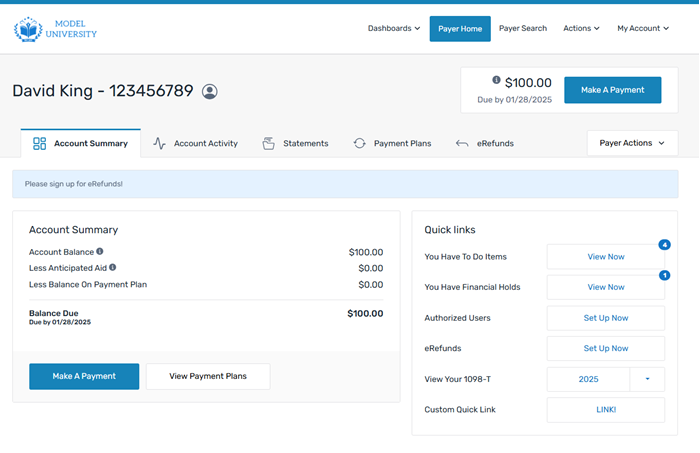
You can view information about your payers using the Payer Home page. |
Features
The available features for the billing and payment management product are:
 Account Summary
The Account Summary tab is the main landing page for payers on the Payer Home page. It shows a summary of the payer's account including any balance due, anticipated aid amounts, and payment plans.
From the Account Summary tab, the payer can view additional features such as approved Authorized Users, the ability to enroll in eRefunds, and their 1098T tax forms.
Payer Activity
Payer activity includes any action taken on an account. The action can be taken by the payer, an Administrator at your institution, or the Flywire system. All payer activity is stored in the SFS system and can be filtered and searched.
On Demand Payment Plans
On demand payment plans are a flexible payment plans where you can choose the amount, length, and timing for the plan. An On Demand payment plan is created manually and is not tied to any tuition or collections bill. Since it is not tied to a bill, an on demand payment plan is never updated by a batch or real time integration process.
The on demand payment plans are not tied to a specific time period and do not need to be completed by the end of the term.
On demand payment plans are always balance based and can never be converted to a balance or budget payment plan.
Balance Payment Plans
Balance payment plans are tuition plans based on real charges. Balance payment plans do not have a budget worksheet and the balance is not editable. Balance payment plans can’t be used until charges are actually on the payer's account, which means they can’t be offered until later. The payer will not see an offer for a balance payment plan until they have charges that match the configured item types.
Budget Payment Plans
Budget payment plans are tuition plans based on potential charges. In budget payment plans, the payer chooses or calculates the plan amount.
You can create budget payment plans three ways:
-
Basic balance input - The payer inputs a dollar amount as a total sum.
-
Budget worksheet - The payer uses the worksheet to calculate an appropriate plan balance.
-
A calculator created by your institution - You can create a budget calculator and incorporate it into the SFS. Flywire takes the calculated amount as the total plan balance. This calculator is maintained by your institution.
Message Feed
The message feed is a feature within the SFS that allows you to display an announcement banner to customers. It is configured at the root level of an institution and cannot be cohort specific.
Notifications
Notifications are SMS text or email messages the SFS sends to the payer. Each type of notification has two templates - a template for email communications and a template for text message (SMS) communications. You can configure the communications using customizable templates.
Statements
Account statements are a feature within the SFS that provides a static summary of the financial transactions that have occurred over a specific period of time.
1098t Tax Forms
The 1098t tax forms feature allows a payer to view and print their 1098t tax forms. 1098t tax forms are US-only tax forms used to assist in claiming tax credits for amounts paid towards tuition.